

Many happy customers will write a review if you ask them. Make it easy for them. Get your Google review link. Share it at the counter, on the bill and on WhatsApp. Then reply to every review.
A family finishes lunch at your café. They smile and say, "Lovely food, we will come again." Then they walk out, and nobody else ever hears it.
That kind word is worth a lot. It just needs to reach Google, where new customers can read it.
Why reviews matter
New customers check reviews before they visit. But first they need to find you on Google Maps (see how to fix that). A shop with recent reviews looks open and cared for.
Google says honest, mixed reviews often feel more trustworthy than only perfect ones (Google). So you do not need perfect reviews. You need real ones, coming in often.
Seven steps you can do this week
1. Get your review link
Your review link is a web address. When a customer taps it, the review box opens.
Sign in with the Google account that manages your listing. Open your Business Profile at business.google.com, or search your business name on Google. Look for the reviews section and a button like Get more reviews, Ask for reviews or Share review form. Tap it, then tap Copy to copy the link (Google).
The button names change from time to time. If you can't find it, Google's help page shows the latest steps.
Save this link in a note on your phone. You will use it many times.
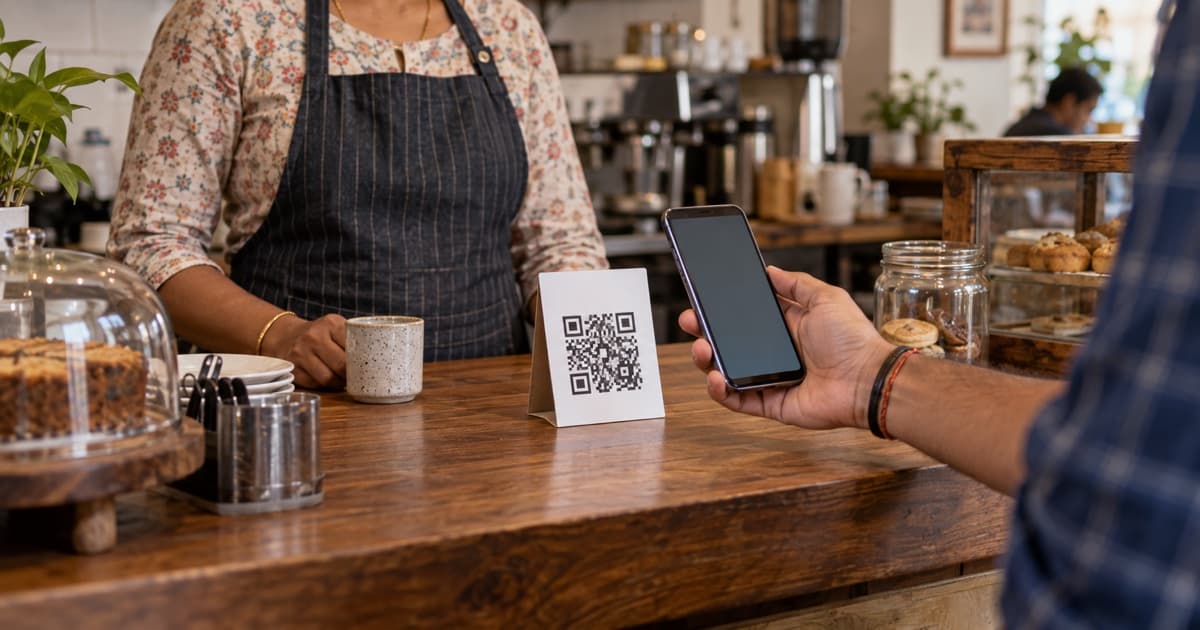
2. Make a QR code card for the counter
A QR code is a small square picture. A customer scans it with the phone camera, and the review page opens.
Google's help page says to make the review QR code on a computer (Google). So use a laptop once. Save the QR image and get it printed at a nearby print shop.
Put a small card at the billing counter. Keep the words simple: "Liked your visit? Scan to tell others on Google."
3. Add one line to your bill
Google suggests putting the link or code on receipts (Google). Ask your billing software provider to add the QR code at the bottom of the bill.
For a handwritten bill, a small QR sticker works too.
4. Send a WhatsApp message after the visit
Google lists WhatsApp as one way to send review requests (Google). Send it the same day, while the visit is fresh.
Send it to every customer who agreed to get messages from you, not only the happy ones. Paste your review link at the end. Here are three messages you can copy:
English (short): Thank you for visiting us today! If you have a minute, please share your experience on Google. It helps other people find us. [your link]
English (for a clinic or salon): Hello, thank you for coming in today. We would like to hear how it went. You can write a short review here: [your link]
Hinglish: Aaj aane ke liye shukriya! Apna experience Google par zaroor likhiye, isse doosre logon ko madad milti hai. [your link]
5. Ask in person, at the right moment
The best time is when a customer says something kind. Smile and say, "Thank you! Would you please write that on Google?" Point to the counter card.
Many customers are more at ease in their own language. Ask in Hindi, Tamil, Marathi or whatever they speak.
6. Help people who are stuck
Some customers say they cannot post a review. Google says a person needs a Google Account to post one (Google).
Show them where to tap. Do not take their phone and type the review for them. It must be their own words.
7. Reply to every review
Your reply shows under the review for everyone to see (Google). To reply, open your Business Profile, tap Read reviews, then tap the reply icon next to the review.
Google asks you to keep replies short, polite and personal. Do not copy the same "thank you" for everyone (Google).
For a bad review, stay calm. Say sorry if you made a mistake. Ask the person to call you to sort it out.
What not to do
Google removes reviews that break its rules. These are the main ones (Google):
- No paying for reviews. This includes paying in kind, like a gift.
- No discounts or gifts for reviews. "10% off if you review us" is not allowed. This also applies to changing or removing a bad review.
- No fake reviews. Do not post many reviews yourself from different accounts.
- No staff or family reviews. People who work for you, or did before, should not review your shop.
- No "review gating". This means asking only happy customers and quietly skipping the unhappy ones. Google does not allow it. Ask everyone the same way.
- No pressure. Do not force anyone, and do not tell them what to write.
Breaking these rules can get reviews removed. It is not worth it.
What "fixed" looks like
After three or four weeks, you should see a few changes.
- A few new reviews come in every week, not once in a while.
- You have replied to each review, good and bad.
- Your newest review is days old, not months old.
- The counter card and bill line are now a habit for your staff.
Keep asking every customer, every day. Small steps each week add up.
You have happy customers already. Now give them an easy way to say so.
Did it work? Check with Viabe Pulse
After a few weeks, ask yourself: do your reviews now win customers, or does the shop next door still look better? Viabe Pulse scans your business online. It shows how your reviews look next to similar businesses nearby. Type your business name to start.
FAQ
Can I give a discount to customers who write a review?
No. Google does not allow any discount, gift or payment for a review (Google).
Can my staff or family write reviews for my shop?
No. Google does not allow reviews from people with a link to your business, like staff.
Can I ask only my happy customers?
No. That is called review gating. Ask every customer the same way.
Can I make the QR code on my phone?
Google says the review QR code can only be made on a computer. You only need to make it once.
Should I reply to bad reviews?
Yes. Reply calmly, say sorry if needed, and invite them to call you. Other customers will see that you care.